4 min read
The boutique customer database that builds itself
Customers who exist only as chat threads aren't a customer book. How Studio OS builds one automatically from orders and enquiries, keyed on phone.
Picture a boutique owner trying to answer a simple question: "That customer who bought two silk suits before Diwali — what was her name?" She knows the face. She knows the suits. She half-remembers a colony name. What she has to search is a WhatsApp history where the woman is saved as "Anita Boutique Customer 3", a notebook where an old measurement hides under a shopping list, and an Instagram DM thread from an account with a marigold as its photo.
Ask any established boutique what its most valuable asset is and the honest answer isn't the stock or the shop — it's the two hundred women who buy again, refer their sisters, and trust the owner with their measurements. Yet that asset usually exists as confetti: scattered across chat threads, notebooks and memory, unsearchable and unownable.
Why the customer book never gets made
Every owner has tried. A diary with a page per customer. A spreadsheet, started in January with great resolve. They all die the same death: data entry. After a long day of fittings, nobody transcribes phone numbers into a register. A customer database that depends on discipline is a database that depends on your least available resource — your evenings.
So the requirement, honestly stated, is strange: a customer book that writes itself. Not another place to enter things. A place where records appear because business happened.
The phone number is the spine
Here's the quiet insight that makes it possible. In boutique retail, every meaningful event already carries a phone number — the order request, the enquiry, the visit. And a phone number is a fingerprint: the same customer may change her Instagram handle or her married surname, but her number persists.
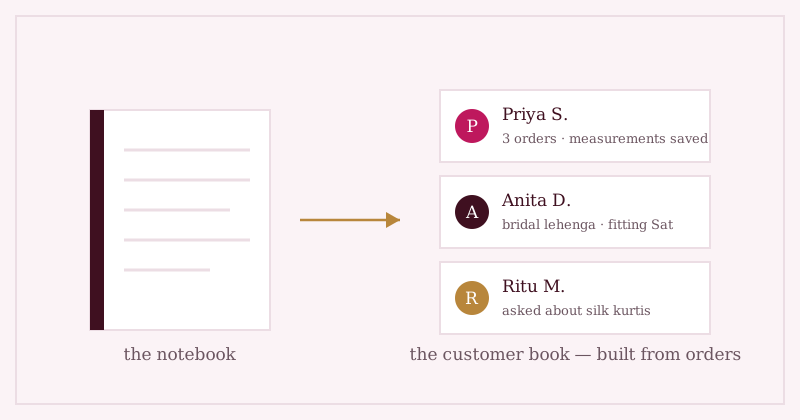
So key everything on the number. The first time an order arrives from 98xxx-xx210, a customer record is born. When an enquiry comes from the same number next month, it attaches to her — not to a duplicate. Order by order, question by question, a profile assembles itself: what she bought, what she asked about, when she was last in touch.
A customer book shouldn't be something you fill in. It should be something your shop secretes — a record left behind by every order and every question, the way a river leaves silt.
History and measurements, on one card
Once the record exists, it becomes the natural home for the two things boutiques most often lose. First, history: her orders and enquiries in one place, so "what did she buy last time?" is a lookup before you reply, not an archaeology session after.
Second, measurements — the boutique's crown jewels and its most easily-scattered data. Bust, waist, sleeve, length: numbers that today live on the tailor's wall or in a photo of a page. Stored on the customer herself, they follow every future order — the full argument is in why custom-stitching measurements get lost, and how to keep them.
And for the loyal customer who's never once ordered through the shop page — the aunty who only ever phones — a manual add takes thirty seconds. The book builds itself, but the door stays open.
Where we're taking this next: letting the book carry more of what you know — tags like "bridal 2027" or "loves pastels", preferences, occasions — so the profile reads the way you'd describe her to a new tailor.
Where Studio OS fits
Studio OS grows your customer book as a side effect of running the shop:
- Customers are created automatically from orders and enquiries, matched on their phone number — the same person never becomes two records.
- Each customer's card holds her order history, enquiries and measurements — nine structured fields plus notes — in one place.
- Manual add exists for the phone-only regulars; nothing forces a customer through the website to be remembered.
- When you follow up about the piece she admired, her card is where the context comes from — and the message is drafted for you to send yourself.
See how orders and enquiries begin on the demo shop, or start with Studio OS — and let "Anita Boutique Customer 3" finally become Anita, with her history attached.